hi, in this blog i write a writeup about the Android MHL Lab called “Strings”.
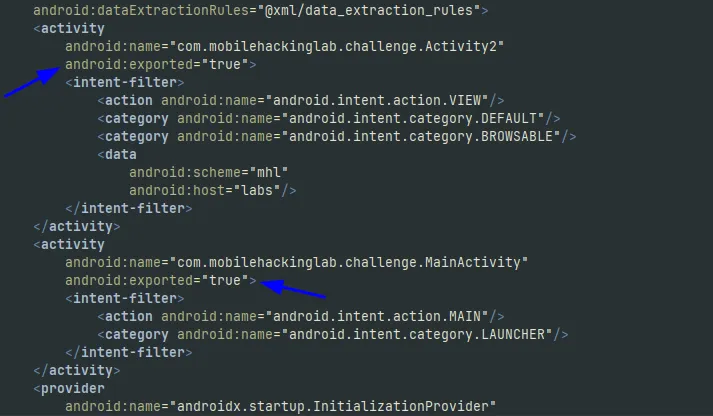
when reversing an android application, the first step is usually analyzing the AndroidManifest.xml. In this file, we identified two exported activities
exported activities are highly interesting because they can be invoked from outside the application using tools like ADB, Drozer, or by sending an Intent from another app
moving on to Activity2, we can see a routine responsible for processing data from the mhl://labs deep link
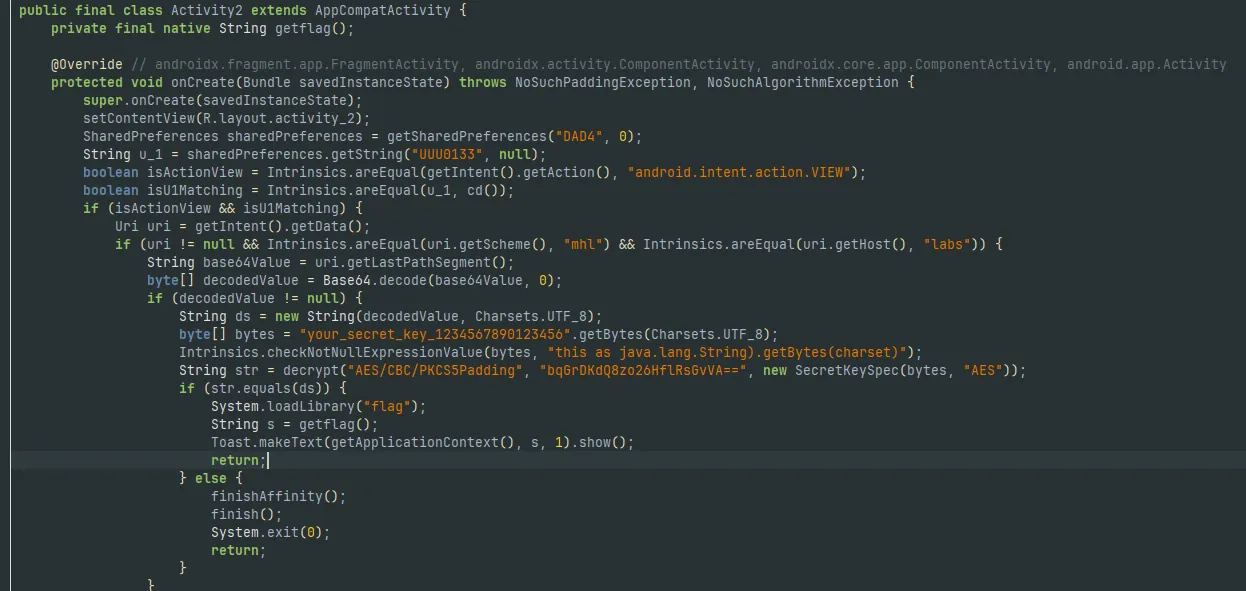
the application uses the AES/CBC/PKCS5Padding cryptographic algorithm. by analyzing the code, we managed to extract the following parameters
- Key: your_secret_key_1234567890123456
- Ciphertext: bqGrDKdQ8zo26HflRsGvVA==
however, to successfully decrypt the ciphertext, we still need the Initialization Vector (IV)
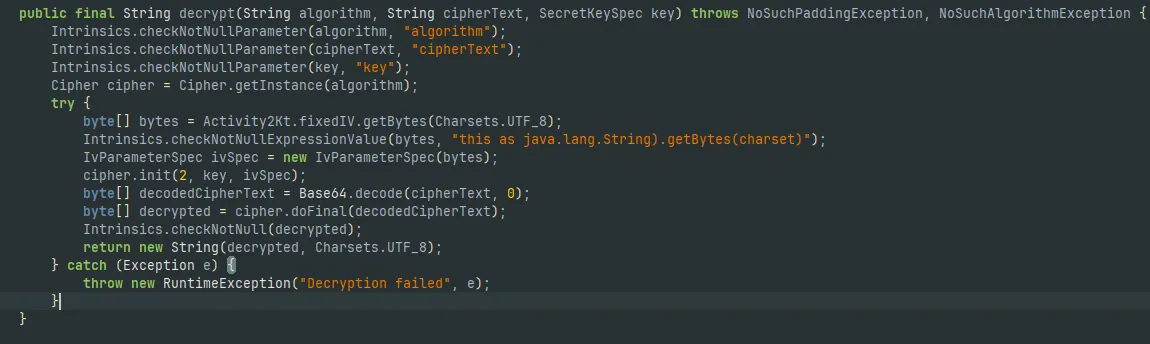
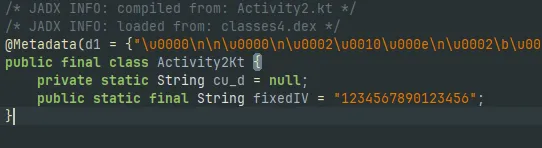
looking at the decrypt method, we will see a reference to a variable named fixedIV. tracing this variable directs us to another class, Activity2Kt, where the IV is actually defined
we can head over to cyberchef to decrypt the ciphertext using the key and IV we found
- Key: your_secret_key_1234567890123456
- IV: 1234567890123456
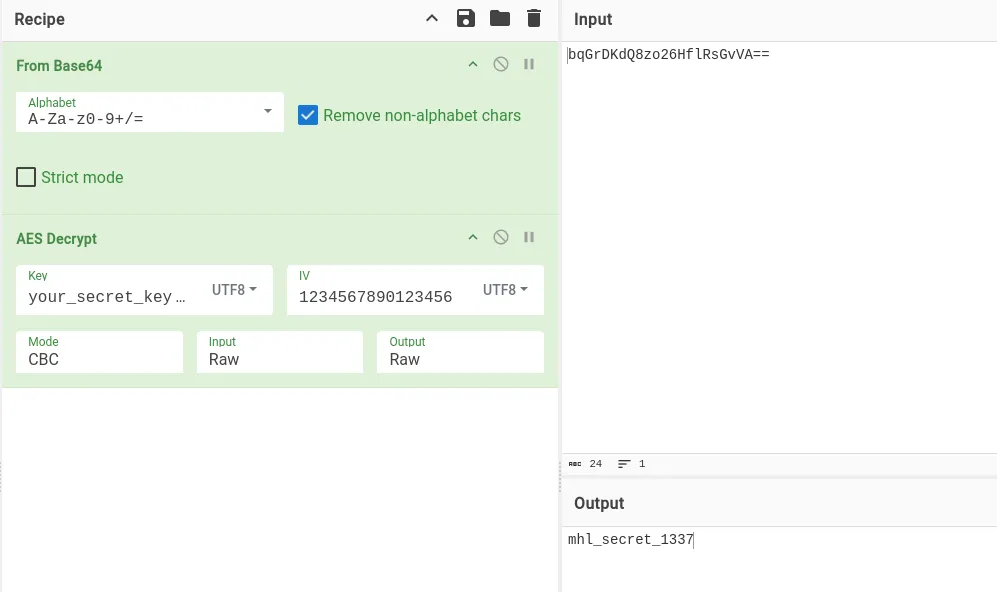
to pass this decrypted secret back to the application via the deep link, it must be base64 encoded first
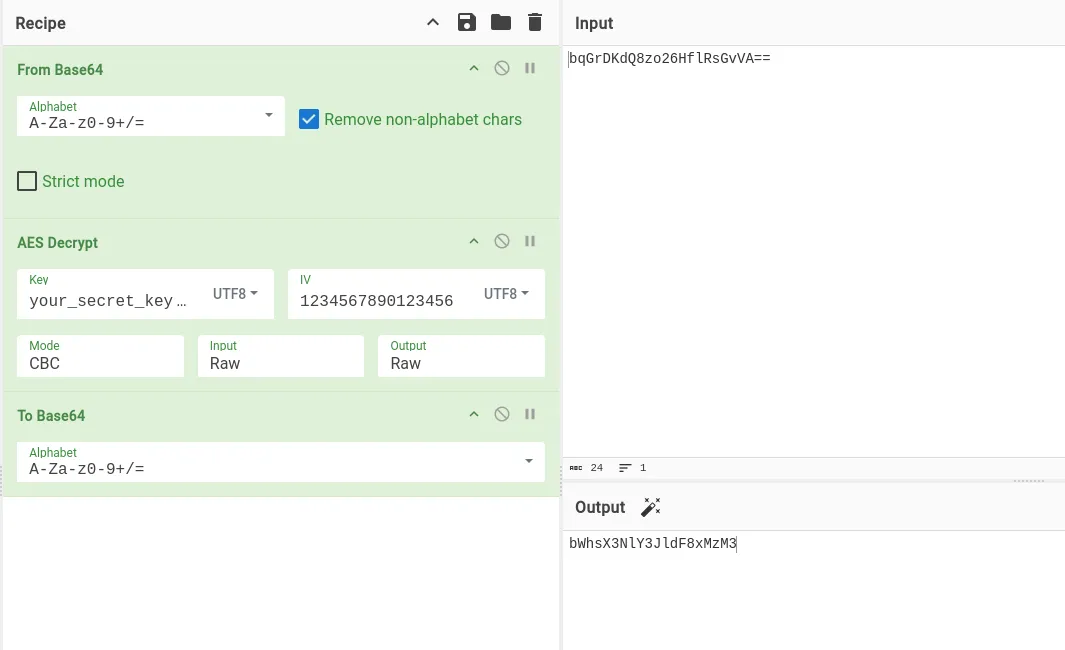
with the payload ready, we can trigger the deep link using ADB:
adb shell am start -a android.intent.action.VIEW -n com.mobilehackinglab.challenge/com.mobilehackinglab.challenge.Activity2 -d "mhl://labs/bWhsX3NlY3JldF8xMzM3"
but the app immediately crashes, to understand why, we can read thru the code, spesifically onCreate method in Activity2
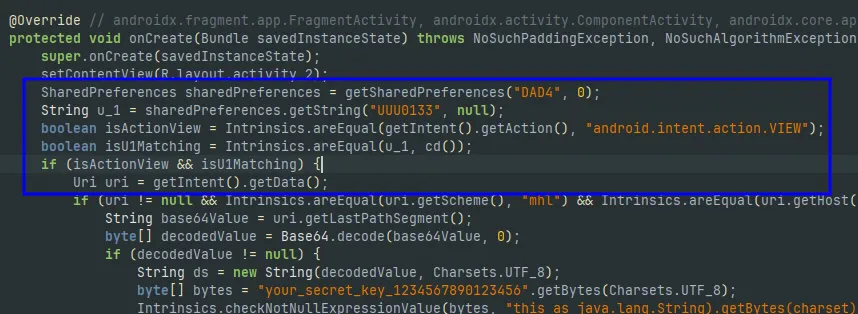
before reaching the decryption logic, the app retrieves a value from SharedPreferences using the key UUU0133 and compares it against the return value of a private method named cd()
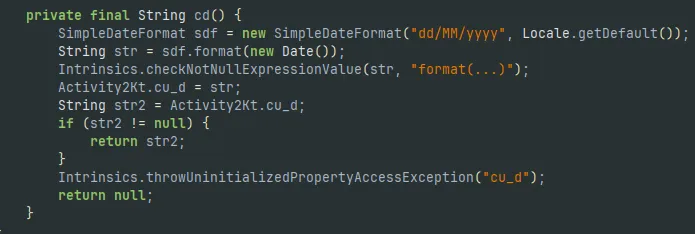
in cd() method, we can see that it initializes a SimpleDateFormat object and formats the current date into a dd/MM/yyyy string
this means the application implements a strict time-based validation. for our deep link payload to be processed, the UUU0133 key in the SharedPreferences must not be empty and must exactly match today’s date
since we invoked the activity directly via ADB without letting the app set this state naturally, the comparison failed, triggering a System.exit(0)
to figure out how to properly set this state, we can look at the MainActivity class. there, we can see a method called KLOW()
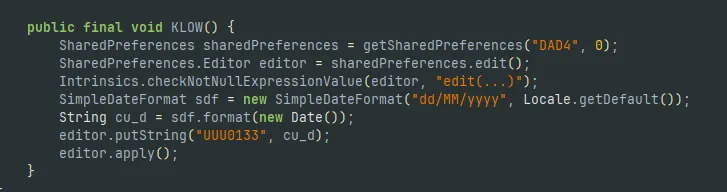
reading through its logic, it became clear that this function is designed to generate the exact SharedPreferences we were missing, formatting today’s date and saving it into the UUU0133 key
but KLOW() is never executed by the app. It just sits there as an unused method
we have a few ways to bypass this, but the most elegant solution doesn’t require rebuilding the APK or having root access to modify XML files
since KLOW() is a public method, we can simply hook into the application using frida, find the active MainActivity instance in memory, and pull the trigger on KLOW() ourselves
here’s the frida script that i use to call KLOW() function
Java.perform(function () {
   Java.choose("com.mobilehackinglab.challenge.MainActivity", {
       onMatch: function (instance) {
           try {
               instance.KLOW();
           } catch (err) {
               console.log("Failed to call KLOW(): " + err);
           }
       },
       onComplete: function () {
           console.log("done.\n");
       }
   });
});
to use frida, we must enable the frida-server first in the android

and now we can try hooking it
frida -U -n Strings -l klow.js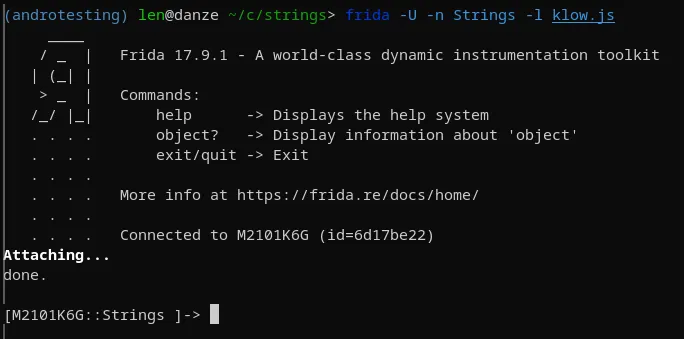
now we can clearly see that the shared_prefs folder in internal storage isn’t empty anymore

and now we can try to trigger the deeplink again
adb shell am start -a android.intent.action.VIEW -n com.mobilehackinglab.challenge/com.mobilehackinglab.challenge.Activity2 -d "mhl://labs/bWhsX3NlY3JldF8xMzM3"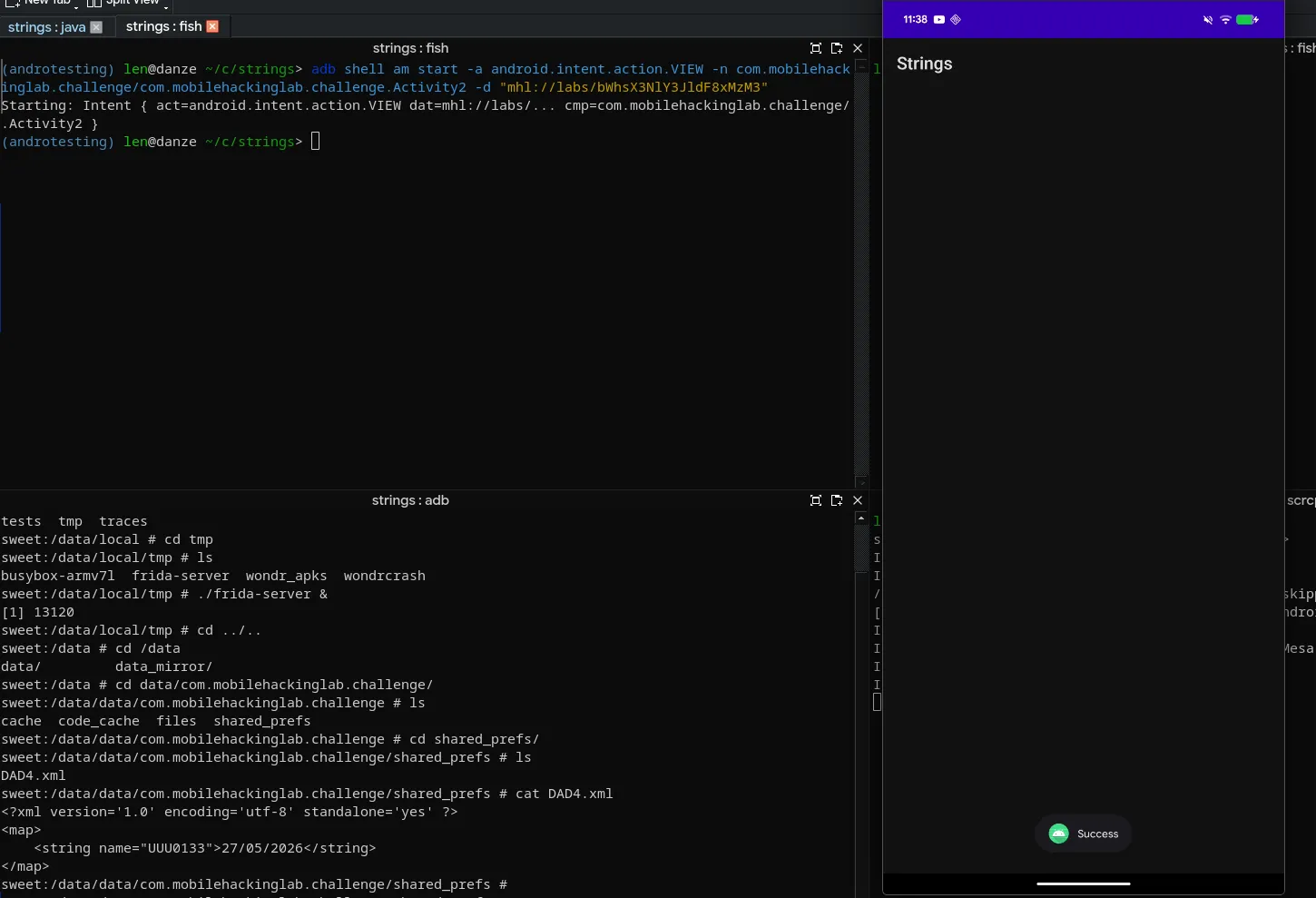
the app doesn’t crash this time, meaning we successfully bypassed the date validation
but we still don’t have the flag. while Activity2 handles the initial validation and deep link decryption, the actual flag generation is offloaded to native code
if we examine the successful execution path inside Activity2, we can clearly see how the application processes the flag once our deep link payload (ds) matches the decrypted string (str)
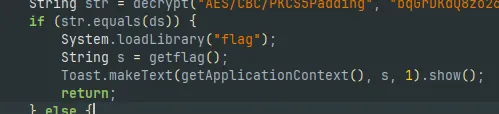
System.loadLibrary("flag");– it loads a native shared object, which translates tolibflag.soin the android filesystemString s = getflag();– it invokes a native JNI method to retrieve the flagToast.makeText(...).show();– it attempts to display the returned string on the screen
however, executing this only yields a toast message saying “Success”, not the actual flag in the MHL{...} format
the java layer is essentially a dummy wrapper. the real flag decryption and storage happen entirely within the native C/C++ layer inside libflag.so
to extract the actual flag, we must shift our focus from java to dynamic instrumentation of the native memory
Java.perform(function() {
   var Activity2 = Java.use("com.mobilehackinglab.challenge.Activity2");

   Activity2.getflag.implementation = function() {
       var retval = this.getflag();
       var module = Process.findModuleByName("libflag.so");
       if (module) {
           var pattern = "4D 48 4C 7B"; // "MHL{" Hex
           Memory.scan(module.base, module.size, pattern, {
               onMatch: function(address, size) {
                   try {
                       var flag = address.readUtf8String();
                       console.log("flag: " + flag);
                   } catch(e) {
                       console.log("failed to extract string: " + e.message);
                   }
                   console.log("======================================\n");
               },
               onError: function(reason) {

               },
               onComplete: function() {
                   console.log("done.");
               }
           });
       } else {
           console.log("libflag.so isn't load.");
       }
       return retval;
   };
});
using the above frida script, we intercept the getflag() method call. instead of blocking the execution, we let the original method run by calling this.getflag()
this is a crucial step because it allows the native C/C++ code to execute its decryption routine and load the actual flag into memory
immediately after the native method finishes, our script locates the base address of libflag.so and uses the Memory.scan API to search for the hex pattern 4D 48 4C 7B (which represents the ASCII string MHL{)
frida -U -n Strings -l memodump.js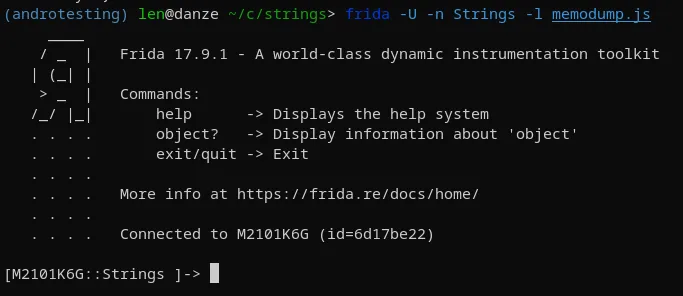
with the script injected, we fire our ADB deep link command one last time
adb shell am start -a android.intent.action.VIEW -n com.mobilehackinglab.challenge/com.mobilehackinglab.challenge.Activity2 -d "mhl://labs/bWhsX3NlY3JldF8xMzM3"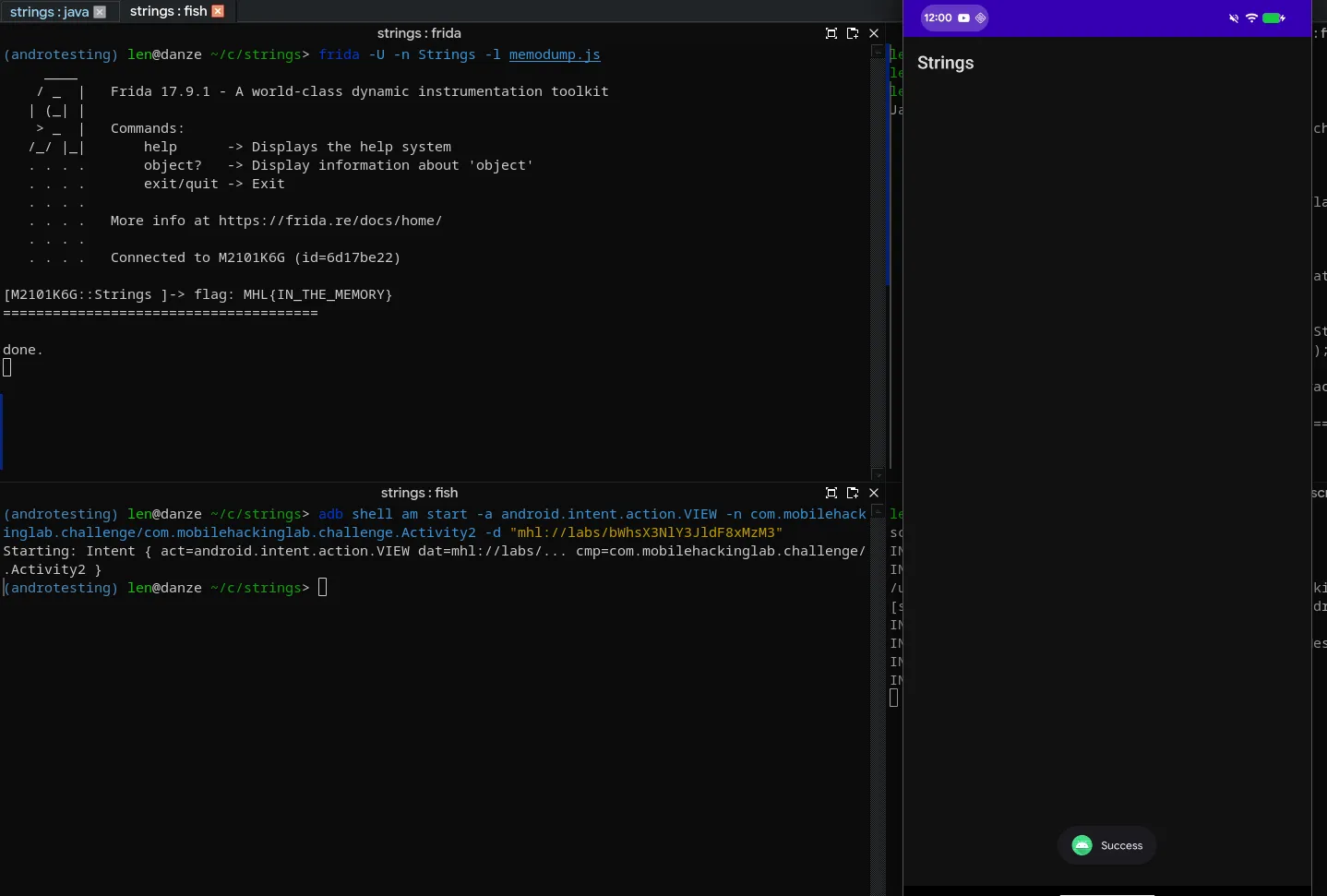
and we got the flag, MHL{IN_THE_MEMORY}